
Generic Audit Surveys are used to collect data for Safety Glazing and the DDA (Disability Discrimination Act) identifying any issues that need attention (for example: Safety Glazing audits to ensure that assets/components containing glass meet safety guidelines, or DDA audits to ensure that the needs of disabled persons visiting or using a property are met).
Managing Generic Audits
To add or edit an audit, do one of the following:
-
Navigate to Health and Safety > Audits > New Audit.
-
Search for an existing audit
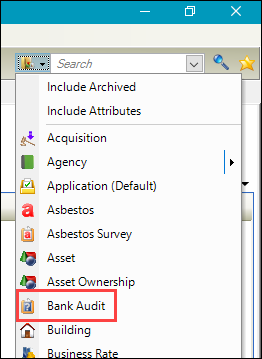
The audits displayed in the Search drop-down are named as defined in Audit Type reference data (accessed by navigating to Health and Safety > Audits > Audits).
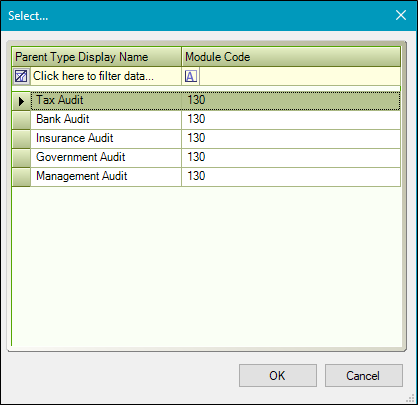
If you are creating a new audit, the Select window is displayed, which lists all of the audit types as defined in Audit Type reference data (accessed by navigating to Health and Safety > Audits > Audits).
-
Select the relevant option and then click OK.
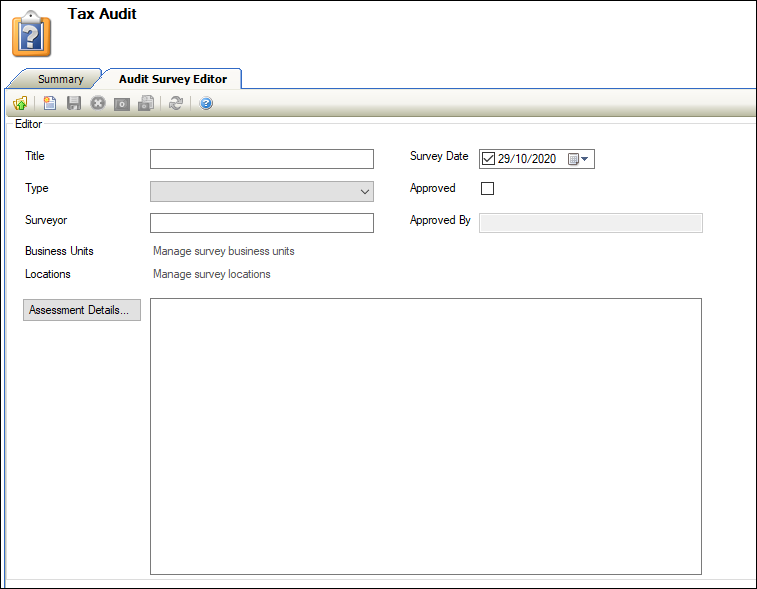
The Audit Survey Editor is displayed.
-
Enter or edit the relevant details.
The fields on the Audit Survey Editor are described in the following table:
|
This field… |
Holds this information... |
|---|---|
|
Title |
The name of the survey. This field is mandatory and must be unique. |
|
Type |
The type of survey. These can be defined in Survey Types reference data (accessed by navigating to Health and Safety > Audits > Audits). |
|
Surveyor |
The name of the surveyor. This field is mandatory. |
|
Business Units |
The relevant business unit. |
|
Location |
The relevant location. |
|
Survey Date |
The survey date. This defaults to today's date but can be edited. |
|
Approved |
Whether the survey has been approved. |
|
Approved By |
The person who approved the survey. |
|
Assessment Details |
The survey's assessment details. Click the Assessment Details button and then select the relevant survey text record. These can be defined in Standard Survey Text reference data (accessed by navigating to Health and Safety > Audits > Audits). |
-
Click Save.
You can use the Audits module to help you do following: