
Select from the following to help configure Key functionality:
Roles and Permissions.
The roles applicable to the Key functionality are described in the following table:
|
Role… |
Allows users to... |
|---|---|
|
BusinessContinuity |
Record the location of keys and the building(s) or room(s) they open, and use the booking system to capture who has which keys and when they are due for return. |
|
Key |
View, create and update key requests. |
|
KeyInIssue |
View currently issued keys. |
|
KeyReferenceData |
View, create and update Key Reference Data. |
|
KeyRequestManager |
View and progress key requests. |
The permissions applicable to the Key functionality are described in the following table:
|
Permission… |
Allows users to... |
|---|---|
|
Service Request Key Create |
Create new key service requests but not edit existing ones |
|
Service Request Key Edit |
Edit existing key service requests but not create ones. |
|
Key Reference Data |
Configure and maintain key reference data. It is advised that this is assigned to a system administrator or highly trained user. |
|
Key |
Create new key records. |
|
Key Request Manager |
Access the Key Request Manager screen. |
Refer to Managing Roles for further information.
System Settings
The following system settings (accessed by navigating to Tools > System Options and then clicking the System Options button) directly affect the Key functionality:
-
Key Auto Unique Number (under Auto Numbering) - whether the system automatically generates the Key Number for each new record entered.
-
Background Colour For Past Return Time (under Key) - the background colour on the Keys In Issue Overview screen for when the key has passed its return time.
-
Background Colour For Within Return Time (under Key) - the background colour on the Keys In Issue Overview screen for when the key is within its return time.
-
Enable Expected Return Time (under Key) - whether to default the Expected Return Time of an issued key to the time set in the Expected Return Time option.
-
Expected Return Duration (under Key) - the default number of days that a key is issued for.
-
Expected Return Time (under Key) - the time of day that an issued key is expected to be returned.
This is only enabled if the Enable Expected Return Time option is set to 'True'.
-
Keys In Issue Overview Refresh (mins) (under Key) - the number of minutes between automatic refreshes on the Keys In Issue overview screen.
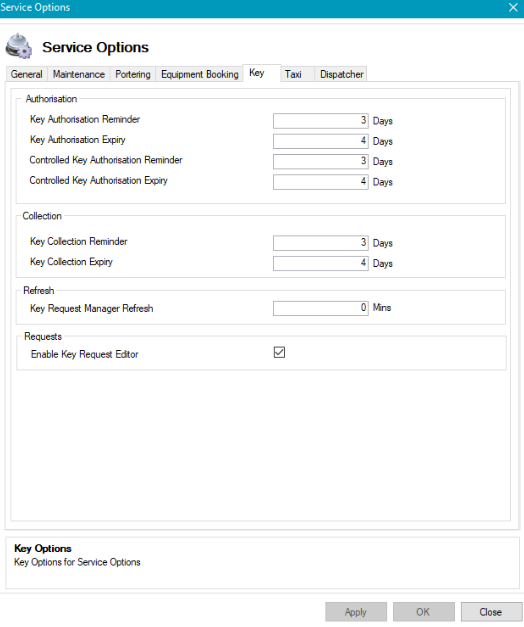
You can also use the Key tab in Service Options to define the options for Key Requests.
Reference Data
The following reference data applies to the key functionality:
-
Key Reference Data (all items)
-
Key Status (in Service Request reference data)
-
Predefined Service Request Events (in Service Request reference data)