
View the Tracking Level for a Workflow
The K2 Workflow Manager module allows you to track workflow activity.
Use Workflow Manager to:
Trigger tracking levels can be viewed for custom, database, product, and schedule triggers.
To view the tracking level for a workflow:
-
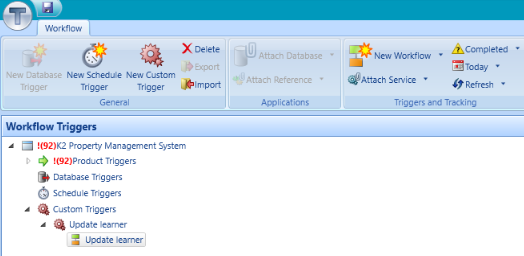
Select the relevant workflow from the Workflow Triggers panel.
-
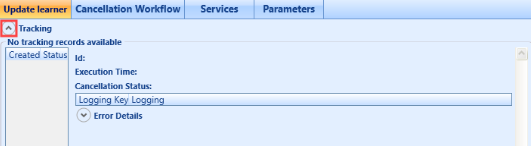
Click the chevron button to reveal or hide the tracking section.
View Tracking Information for a Workflow
The buttons in the Triggers and Tracking group on the Workflow ribbon enable you to alter the activity displayed for the relevant workflow.
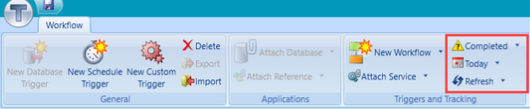
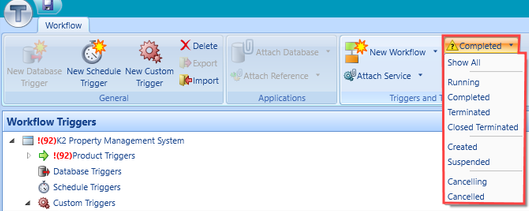
The top tracking button changes the workflow tracking status filter.
-
Select from the following:
-
Show All – displays all tracking records.
-
Running – displays records for workflows that are currently executing.
-
Completed – displays records for workflows that have been completed.
-
Terminated – displays records for workflows that have failed in execution.
-
Closed Terminated – preserves error data, but does not affect the error flagging.
-
Created - displays created workflows.
-
Suspended - displays suspended workflows.
-
Cancelling - displays workflows that are currently cancelling.
-
Cancelled - displays cancelled workflows.
-
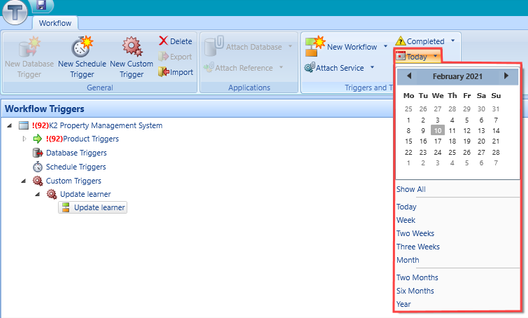
The middle tracking button changes the workflow tracking date filter.
-
Select from the following:
-
Calendar - displays tracking information for a specific day.
-
Show All - displays all available tracking information.
-
Today - displays tracking information for the current date.
-
Week - displays tracking information for the week.
-
Two Weeks - displays tracking information for the past two weeks.
-
Three Weeks - displays tracking information for the past three weeks.
-
Month - displays tracking information for the past month.
-
Two Months - displays tracking information for the past two months.
-
Six Months - displays tracking information for the past six months.
-
Year - displays tracking information for the past year.
-
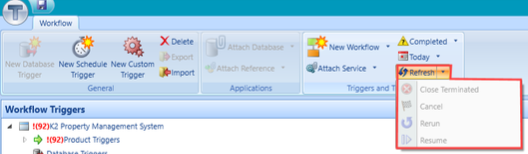
The bottom tracking button refreshes the current workflow tracking data.
-
Select from the following:
-
Refresh - reloads the display.
-
Close Terminated – changes the status of a Terminated workflow to Closed Terminated.
-
Cancel – stops the execution of a currently running workflow.
-
Rerun – resubmits the selected workflow with the parameters against the selected workflow.
-
Resume – restarts a suspended workflow.
-