
Use the Estates Options screen to configure the Rolling Valuation Programme for the Valuation module.
You need a role with the EstatesOption permission to manage the Estates Options.
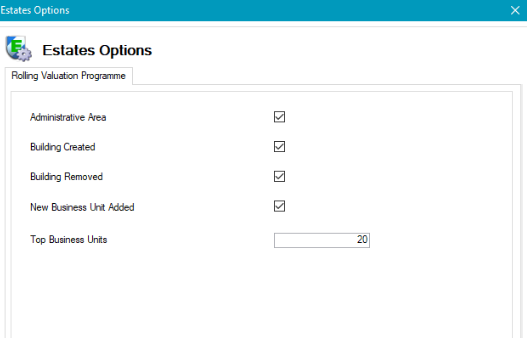
The fields on the Rolling Valuation Programme tab are described in the following table:
|
This field… |
Holds this information... |
|---|---|
|
Administrative Area |
This option uses the Administrative Area Reference Data (accessed by navigating to Estates > Valuation > Valuation) and provides the ability to split administrative areas by financial year. Multiple Administrative Areas can be selected for a financial year. |
|
Building Created |
Whether valuations will be required in the financial year when a new building is added to a business unit. |
|
Building Removed |
Whether valuations will be required within the financial year when a building is archived against a business unit. |
|
New Business Unit Added |
Whether valuations will be required within the financial year for any new business units added in K2. |
|
Top Business Units |
Whether valuations will be required within the financial year for the topmost expensive business units from the last financial year valuations. Specifying the value determines the number to be valued. |
The administrative area recorded against the business unit is used when applying the Administrative Area option.