
The following tabs are available on the Maintenance Status window (accessed by creating or editing a record in Service Request reference data for Maintenance Status):
Detail
Use the Detail tab to record basic details of the status.
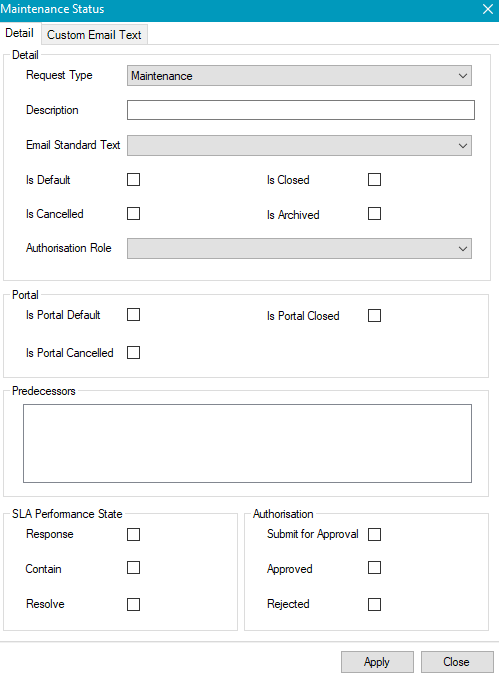
The fields on the Detail tab are described in the following table:
|
This field… |
Holds this information... |
|---|---|
|
Request Type |
The type of request. Select from the drop-down list. |
|
Description |
A description of the status. This field is mandatory. |
|
Email Standard Text |
The standard email text. Select from the drop-down list. |
|
Is Default |
Whether the equipment booking status is the default. |
|
Is Cancelled |
Whether the equipment booking status is cancelled. |
|
Authorisation Role |
The K2 user role with access to the status. Select from the drop-down list. |
|
Is Closed |
Whether the equipment booking status is closed. |
|
Is Archived |
Whether the equipment booking status is archived. |
|
Is Portal Default |
Whether the portal status is the default. |
|
Is Portal Cancelled |
Whether the portal status is cancelled. |
|
Is Portal Closed |
Whether the portal status is closed. |
|
Predecessors box |
The predecessor to the current status. Where applicable, select the relevant check box to define the predecessor to the current status (for example: a predecessor of the 'Completed' status might be the ‘In progress’ status. The user can only move a request onto ‘completed’ once it passes through the status of ‘In Progress’ status, creating a pathway for the movement of statuses). |
|
Response |
Whether the status for SLA performance is the default. |
|
Contain |
Whether the status for SLA performance is contained. |
|
Resolve |
Whether the status for SLA performance is resolve. |
|
Submit for Approval |
Whether the authorisation status is submit for approval. Restricts the status of users with sufficient privileges. |
|
Approved |
Whether the authorisation status is submit for approved. Restricts the status of users with sufficient privileges. |
|
Rejected |
Whether the authorisation status is submit for rejected. Restricts the status of users with sufficient privileges. |
Custom Email Text
Use the Custom Email Text tab to create email templates for when a maintenance status is changed.
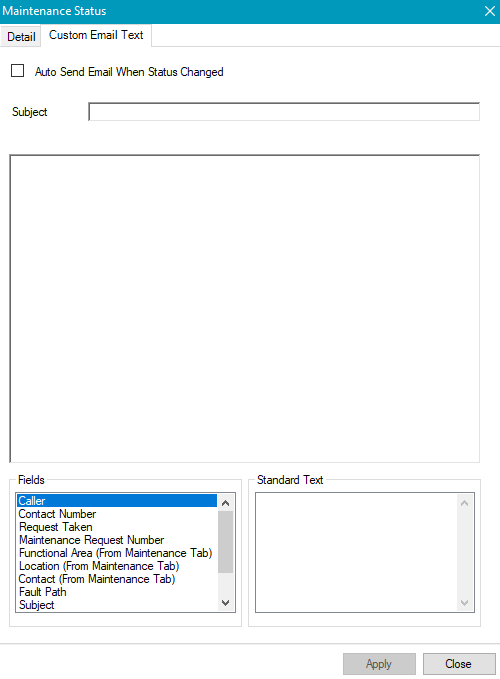
The fields on the Custom Email Text tab are described in the following table:
|
This field… |
Holds this information... |
|---|---|
|
Auto Send Email When Status Changed |
Whether to automatically distribute an email when the maintenance status is changed. |
|
Subject |
The standard subject text for the email (for example Maintenance request number). |
|
Text box |
The body text for the email. |
|
Fields |
The list of data record fields. Fields can be dragged into the text box to populate the body text. |
|
Standard Text |
The standard email disclaimer text is defined in the system settings. Fields can be dragged into the text box to populate the body text. |