
The Schedule of Rates reference data window can be accessed by navigating to Functions > Schedule of Rates > SOR.
You must have a role with the ScheduleOfRatesReferenceData permission to access this window.
Refer to Managing Reference Data for further information on using reference data screens.
The following reference data is available:
Rate Types
Use this reference data to define different types of rates (for example: Standard Rate).

The fields on the Rate Types grid are described in the following table:
|
This field… |
Holds this information... |
|---|---|
|
Description |
A description of the rate type. |
|
Cost Name1 to CostName3 |
Labels for the cost types (for example: Labour, Material, Plant). |
|
Allow Composite |
Whether the rate type can be used for a composite. |
|
Archive |
Whether the rate type is archived. |
Schedule of Rates
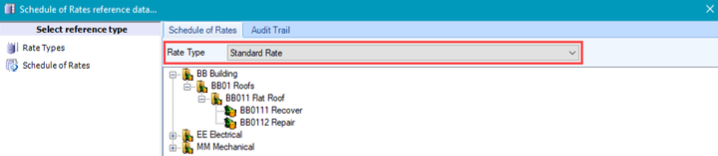
Use this reference data to define schedules of rates. Select a Rate Type from the drop-down list to display the Schedule of Rates.
Actions can be carried out using the menu accessed by right-clicking in the window or on an item.
The options available are dependent on the type of item selected.
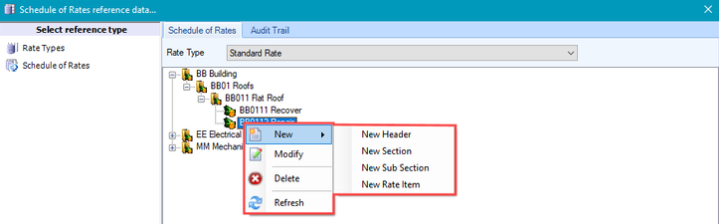
The menu allows you to do the following:
-
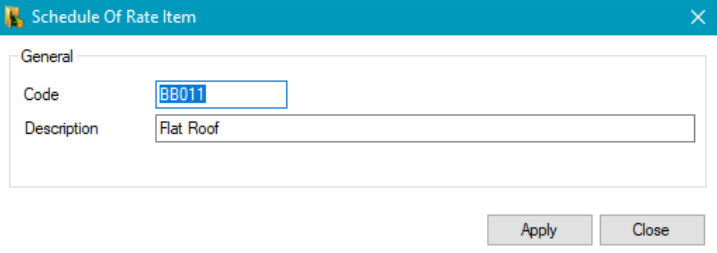
Add a new header, section, or sub-section by selecting the relevant option under New. This displays the Schedule of Rate Item window, where you can enter a code and description for the item.
-
Add a new rate item by navigating to New > New Rate Item - this displays the Schedule of Rate Item window.
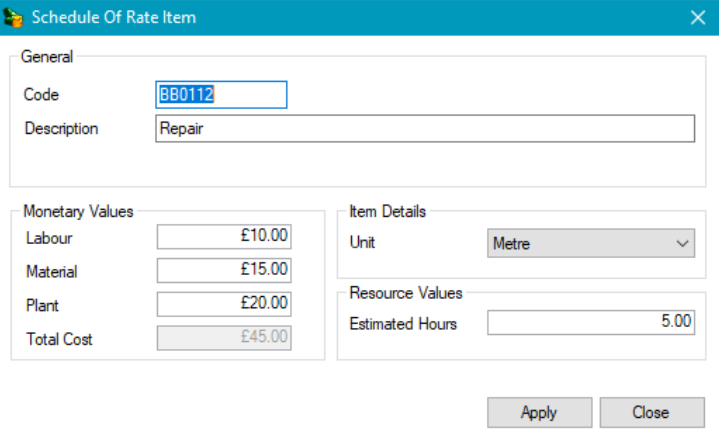
The fields on the Schedule of Rate Item are described in the following table:
|
This field… |
Holds this information... |
|---|---|
|
Code |
A user-defined code for the item. |
|
Description |
A description of the item. |
|
Labour, Material, and Plant. |
The costs. These field names are defined by the selected rate type. |
|
Total Cost |
The total costs. This is the sum of the preceding Cost Name fields. |
|
Unit |
The unit of measurement. These can be defined in Measurement Unit Types (accessed by navigating to Functions > Core > Reference Data > Core). |
|
Estimated Hours |
The estimated time it will take to carry out the work in hours. |
-
Edit the selected item by clicking the Modify option
-
Delete the selected item by clicking the Delete option
If the item has been used on an estimate, it will not be deleted.
-
Refresh the window using the Refresh option